

The Education Impact report shines a light on the role your library plays in learning. It focuses on your student patrons — the reading they do, the grade levels they represent, the reading levels of the materials they choose, and the ways the collection supports the curriculum.
It's a friendly, encouraging way to see how students are engaging with the library, and it's especially useful when you want to show teachers, principals, school boards, or funders the difference the library makes for learners. The report gently turns everyday circulation activity into a clear picture of educational value.
You'll find the Education Impact report under Insights in the main menu.
Before you begin: student patron types
The Education Impact report is built from circulation activity by student patrons. A patron type counts as a student type when the Student box is checked on the Patron Types page (Patron › Patron Types). If no patron types are configured as students, the report can't be produced and Surpass will show a short message inviting you to set one up first.
Setting your options
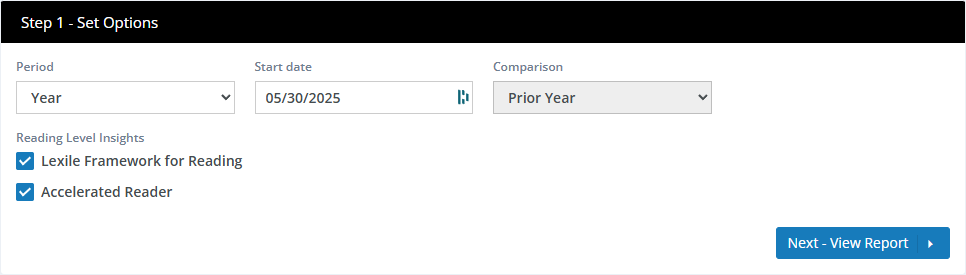
Surpass fills in sensible defaults, so you can click Next - View Report right away or adjust the options first.
| Option | What it does |
|---|---|
| Period | Sets the length and type of the reporting window. Year covers a rolling 12 months; Month covers a rolling month; Calendar Month lets you pick one complete calendar month; and Calendar Year lets you pick one complete calendar year. |
| Start date | The first day of the period. For Calendar Month and Calendar Year, the date picker switches to choosing a month or year so the period lines up with the calendar. |
| Comparison | The earlier period the report compares against. For year-length periods this is always Prior Year; for month-length periods you can choose Prior Month or the same month in the Prior Year. |
| Reading Level Insights | Lets you include reading-level panels on the report. Lexile Framework for Reading and Accelerated Reader are each available when your library subscribes to the matching Surpass Reading Program Service. When a subscription isn't present, that checkbox is unavailable and the matching panel is left off the report. |
If your data doesn't reach back far enough to fill the comparison period, the report shows the current numbers without a comparison.
Reading the Report
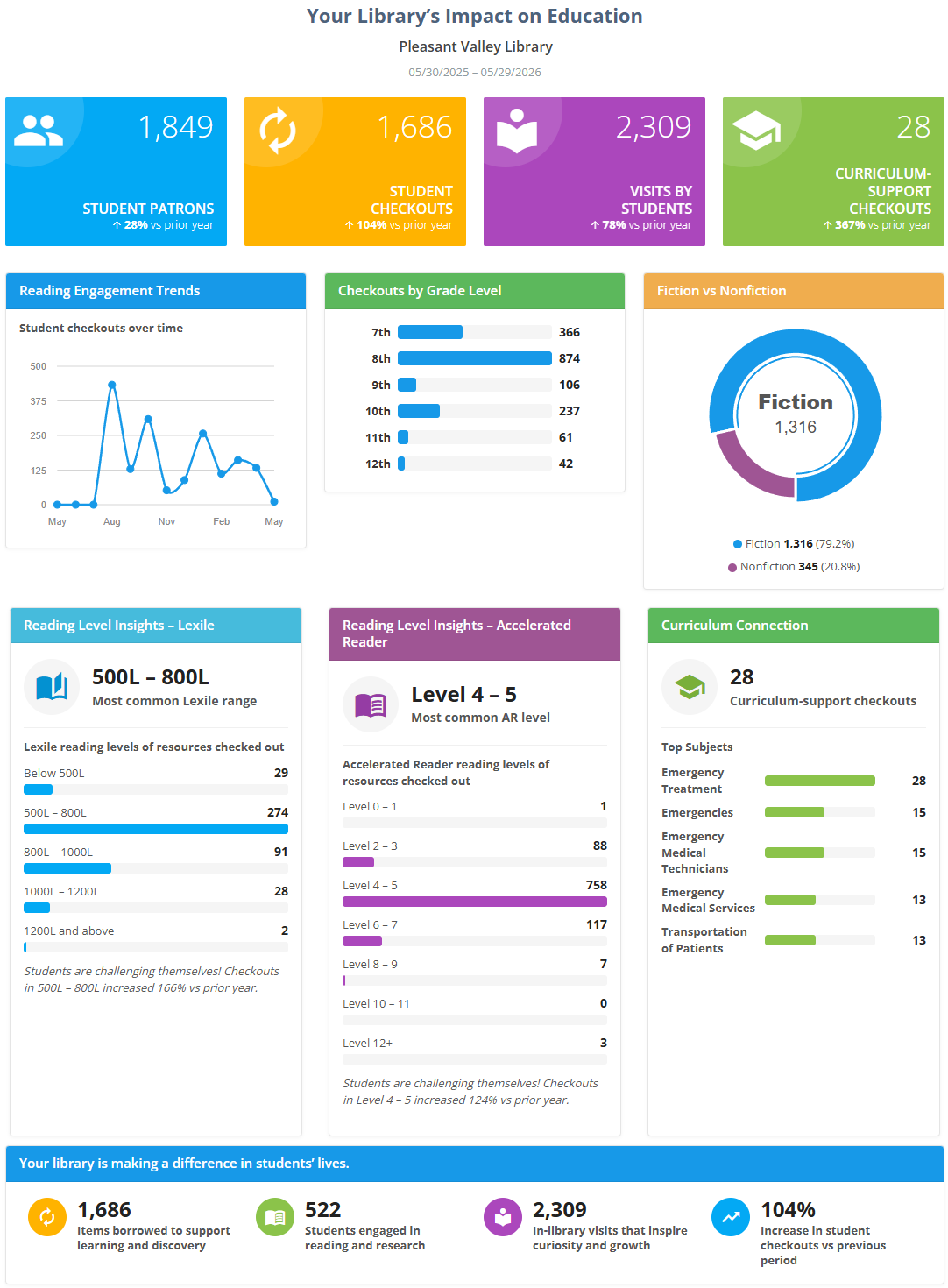
The report opens with your library's name and the date range, then presents the panels below. Numbers that can be compared with the earlier period show a small percentage with an up or down arrow.
Headline Metrics
- Student Patrons — the number of distinct student patrons who had at least one checkout or renewal during the period.
- Student Checkouts — the total number of checkouts by student patrons during the period.
- Visits by Students — how often students engaged with the library, counted as the number of days on which each student had a trackable interaction (checkout, check-in, renewal, or hold), summed across all students. It reflects recorded activity rather than foot traffic.
- Curriculum-Support Checkouts — student checkouts of materials that support the curriculum (see Curriculum Connection below for how an item qualifies).
Reading Engagement Trends
A line chart showing student checkouts month by month across the period, so you can see how reading activity rose and fell over time.
Checkouts by Grade Level
A set of bars showing how checkouts were distributed across student patron types (typically grade levels). Each "grade level" is one of your student patron types (using its short caption when one is set), so the chart adapts to however your library has organized its students.
Fiction vs Nonfiction
A donut chart that splits student checkouts into fiction and nonfiction, classified from each item's call number. It's an easy way to see the balance between reading for pleasure and reading for information.
Fiction/non-fiction is determined by the call number. Call numbers beginning with these prefixes are considered to be fiction:
F,FIC,JFIC,FICTION,E,EZ,YA,GRAPHIC,
MANGA,SCI-FI,SF,FANTASY,MYSTERY,ROMANCE,HORROR,WESTERN. If your Surpass Cloud is set to use Library of Congress call numbers,PZis also considered fiction. Please let us know if you're library uses a prefix not listed here for fiction call numbers.
Reading Level Insights — Lexile and Accelerated Reader
These panels appear only when your library subscribes to the matching service and you've left the option checked. Each one shows:
- Most common Lexile range / Most common AR level — the reading-level band that accounted for the most student checkouts during the period.
- A breakdown of the reading levels of the materials students checked out, with a short callout summarizing the trend (and, when a comparison period is available, how it changed).
Curriculum Connection
This panel is always shown. It highlights how the collection supports classroom learning:
- Curriculum-support checkouts — the number of student checkouts of curriculum-supporting materials during the period. An item counts as curriculum-supporting based on its resource category: categories explicitly flagged as curriculum support always count, categories explicitly flagged as not curriculum support never count, and for everything else Surpass decides from the item's call number (Dewey 000-699 and 900-999; Library of Congress A-L, Q-T, and Z).
- Top Subjects — the leading subjects among those curriculum-support checkouts, drawn from the subject headings in the catalog records (MARC Field 650$a).
Summary band — "Your library is making a difference in students' lives"
A celebratory band near the bottom restates the period's impact in friendly terms:
- Items borrowed to support learning and discovery — total student checkouts during the period.
- Students engaged in reading and research — the number of distinct students who had at least one checkout or renewal.
- In-library visits that inspire curiosity and growth — the student visits measure described above.
- A fourth, adaptive highlight (see below).
The adaptive highlight
The fourth tile in the summary band changes depending on what the data shows, so it always presents an encouraging, meaningful number:
- When student checkouts are up compared with the prior period, it shows the percentage increase in student checkouts versus the previous period.
- When the trend is flat, down, or there's no prior period to compare against, it instead shows the student engagement rate — the share of student patrons who borrowed at least one item during the period.
Footer Note
A short caption beneath the report restates the comparison period in plain language, including the exact dates of the prior period.
Viewing, Printing, and Downloading
From the View Report step you can print the report or download it as a PDF using the buttons at the top of the panel — handy for attaching to a board packet or annual report. See Viewing and Printing Reports.