

The Patron Engagement report focuses on the people your library serves and how they connect with it over time. Rather than counting items, it counts engagement — how many patrons are active, how often they come back, when they're most active, and which patron groups are the most engaged.
It's a warm, people-centered view of your library, and it's a natural fit for telling your story to the community and to funders: it shows not just that materials are moving, but that real people are returning again and again. The report makes patterns of loyalty and participation easy to see and easy to share.
You'll find the Patron Engagement report under Insights in the main menu.
Setting your Options
Surpass fills in sensible defaults, so you can click Next - View Report right away or adjust the options first.

| Option | What it does |
|---|---|
| Period | Sets the length and type of the reporting window. Year covers a rolling 12 months; Month covers a rolling month; Calendar Month lets you pick one complete calendar month; and Calendar Year lets you pick one complete calendar year. |
| Start date | The first day of the period. For Calendar Month and Calendar Year, the date picker switches to choosing a month or year. |
| Comparison | The earlier period the report compares against. For year-length periods this is always Prior Year; for month-length periods you can choose Prior Month or the same month in the Prior Year. |
If your data doesn't reach back far enough to fill the comparison period, the report shows the current numbers without a comparison.
About "patron activity"
Throughout this report, a patron is counted as active on a day when they had a checkout, check-in, or hold on that day. A single patron who was active on several days counts once per day — these are called patron activity days.
Reading the Report
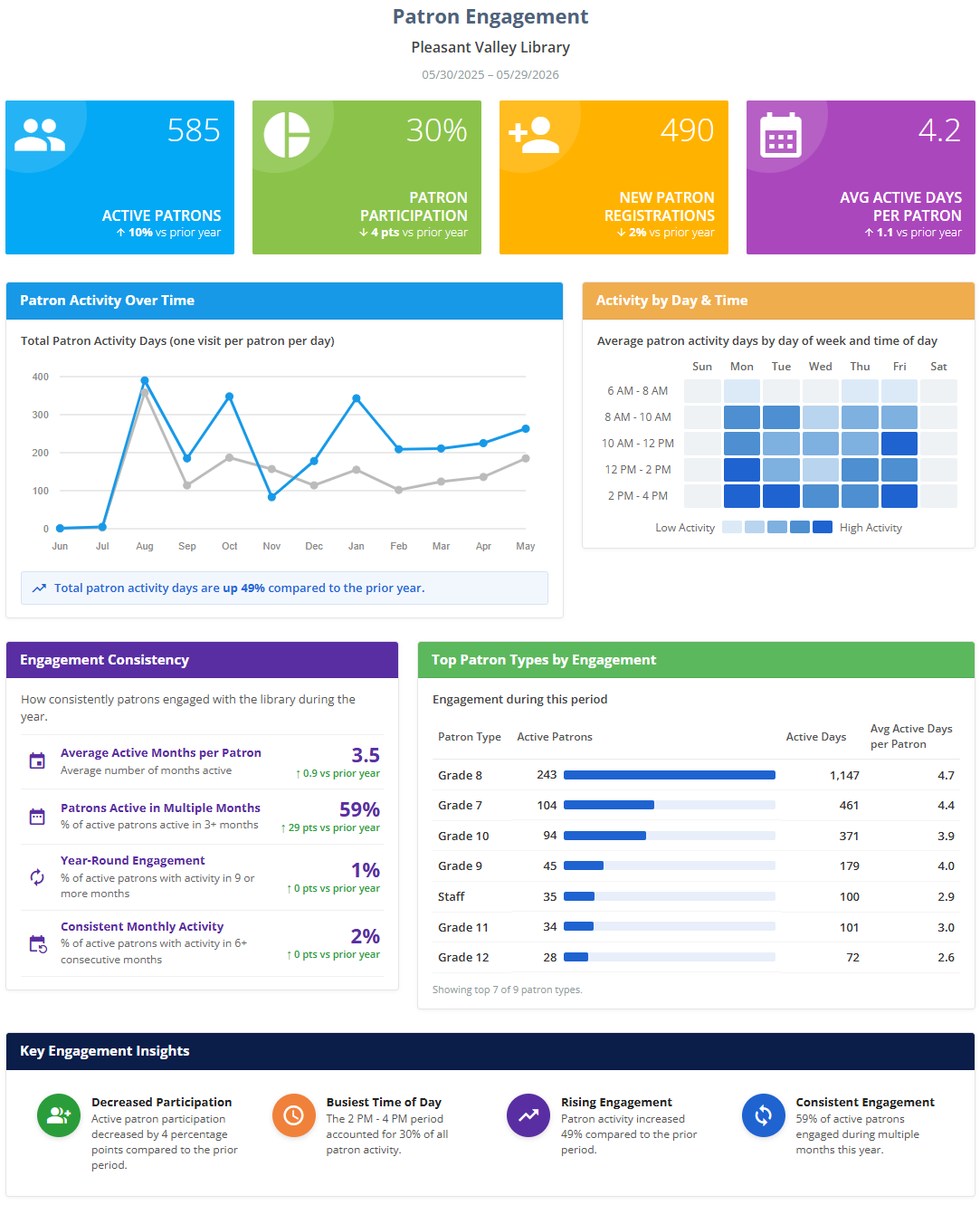
The report opens with your library's name and the date range, then presents the panels below. Numbers that can be compared with the earlier period show a small percentage (or point) change with an up or down arrow.
Headline Metrics
- Active Patrons — patrons with at least one day of recorded activity during the period.
- Patron Participation — the percentage of registered patrons who were active during the period. The denominator is the number of non-inactive patrons on record as of the report's end date. Because it's a percentage, its change is shown in percentage points.
- New Patron Registrations — patrons newly registered during the period.
- Avg Active Days per Patron — the total number of patron activity days divided by the number of active patrons, showing how often the typical active patron engaged.
Patron Activity Over Time
A line chart of total patron activity days month by month (counting one visit per patron per day), with a short callout summarizing the trend. It shows how engagement rose and fell across the period.
Activity by Day & Time
A heatmap showing the average patron activity by day of the week and time of day. Darker cells mean busier times. Surpass automatically groups the hours into readable time bands and trims away the quiet early-morning and late-night hours, so the chart stays focused on when your patrons are actually active. This panel is a great help when planning staffing, programs, or service hours.
Engagement Consistency / Repeat Engagement
This panel adapts to the length of the period you selected, because "how consistently patrons engage" means something different over a full year than it does over a single month. Its title, subtitle, and the measures it shows change accordingly:
For longer periods (about a year or more), the panel is titled "Engagement Consistency" and looks at activity across months:
- Average Active Months per Patron — the average number of months in which an active patron had any activity.
- Patrons Active in Multiple Months — the share of active patrons who were active in three or more months.
- Year-Round Engagement — the share of active patrons with activity in nine or more months.
- Consistent Monthly Activity — the share of active patrons with activity in six or more consecutive months.
For shorter periods (less than about a year), the panel is titled "Repeat Engagement" and looks at activity across days:
- Repeat Engagement Rate — the share of active patrons who engaged on two or more days.
- Multi-Day Patrons — the share of active patrons with activity on three or more days.
- Avg Active Days per Patron — the average number of days an active patron was active.
- Single-Day Patrons — the share of active patrons with activity on only one day. (For this measure, a decrease over time is the encouraging direction, since it means fewer patrons engaged just once.)
Top Patron Types by Engagement
A table ranking your most engaged patron types. Each patron is assigned to the patron type they used most during the period, and the table shows, for each type:
- Active Patrons — distinct active patrons of that type.
- Active Days — total patron activity days for that type.
- Avg Active Days per Patron — active days divided by active patrons.
Key Engagement Insights (the bottom row)
The bottom row is a set of four automatically generated Key Engagement Insights, one in each of four themed slots. For each slot, Surpass chooses the strongest available insight for your data and the period you selected, so the exact wording will vary from one report to the next. The four slots are:
- Participation — either Increased/Decreased Participation (when participation changed meaningfully versus the prior period) or Broad Participation (the share of registered patrons who were active).
- Timing — either Peak Activity Day (when one day of the week clearly stands out, typically on shorter reports) or Busiest Time of Day (the time band that accounted for the largest share of activity).
- Trend / Peak — either Rising or Declining Engagement (when activity changed meaningfully versus the prior period), Peak Activity Month (on longer reports, when one month clearly stands out), or a neutral Steady Engagement / Engagement Trend note when there isn't enough to compare.
- Consistency / Repeat — Consistent Engagement on longer reports (drawn from the Engagement Consistency panel) or Strong Repeat Engagement on shorter reports (drawn from the Repeat Engagement panel).
Footer Note
A short caption beneath the report restates the comparison period in plain language.
Viewing, Printing, and Downloading
From the View Report step you can print the report or download it as a PDF using the buttons at the top of the panel — handy for attaching to a board packet or annual report. See Viewing and Printing Reports.