
The Library Comparison report shows how your library compares with similar libraries in the Surpass community. Instead of looking only at your own activity, this report adds context by comparing key engagement, collection freshness, and availability measures with anonymous, aggregated data from participating libraries.
This report can help answer questions such as:
- How does our patron engagement compare with similar libraries?
- Are our active patrons checking out more or fewer resources than expected?
- Is our collection newer or older than similar libraries?
- Are patrons waiting longer or shorter for held items?
You'll find the Library Comparison report under Insights in the main menu.
About Anonymous Library Metrics
Library Comparison uses anonymous, aggregated library statistics from participating Surpass libraries. These shared metrics make it possible to calculate comparison values such as the group median and top quartile.
Surpass does not include patron names, patron contact information, titles, circulation histories, or library-identifying information in comparison reports.
To use this report, Share anonymous library metrics must be enabled for the location in Settings > General > Library.
If metric sharing is turned off, the Library Comparison report will not be available for that location. If sharing is turned back on later, access will resume after one month.
Setting Your Options
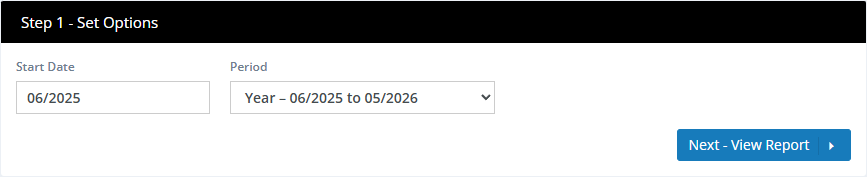
Surpass fills in sensible defaults, so you can click Next - View Report right away or adjust the options first.
| Option | What it does |
|---|---|
| Starting date | Sets the beginning month and year for the report. This defaults to one year ago. |
| Period | Sets the reporting window. Year covers a 12-month period starting with the selected month. Month covers only the selected month. |
The period options may be limited depending on the starting date you choose. If the selected starting date is less than one year ago, the report can only be run for one month.
Comparison data is updated monthly on the 1st day of the month. Data for the current month is not available until the following month.
The earliest starting date depends on how much comparison data has been collected. At this time, Library Comparison data is available beginning January 2025. Earlier dates may become available in future updates as more comparison history is collected.
Reading the Report
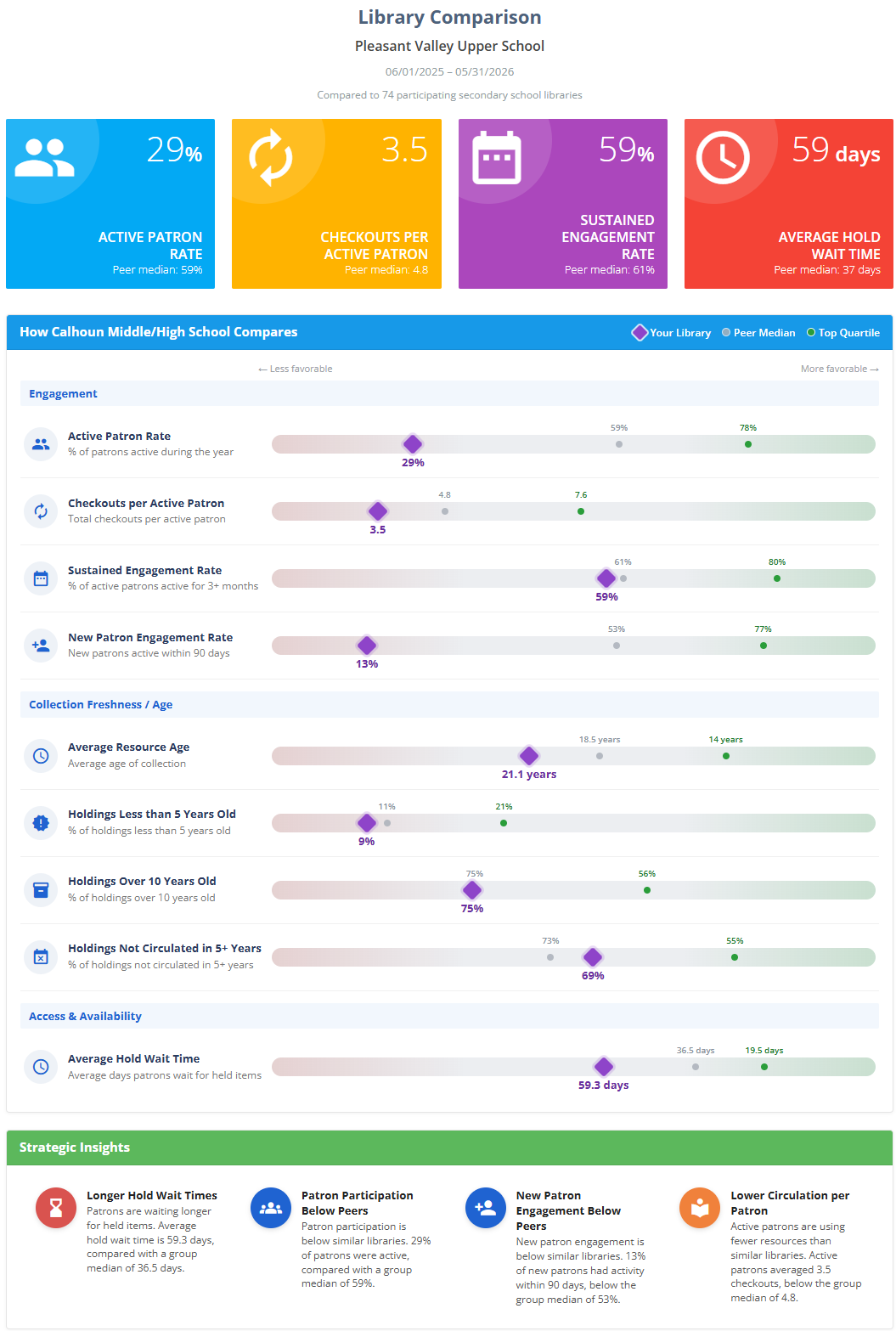
The report opens with your library's name, the date range, and the comparison group used for the report. The comparison group is based on similar participating libraries, such as participating school libraries.
The report is divided into three main sections:
- Headline metrics
- How your library compares
- Strategic insights
Headline Metrics
The four headline panels summarize key measures from the report.
Active Patron Rate
The percentage of patrons who were active during the report period.
A patron is counted as active if they had recorded library activity during the period, such as a checkout, renewal, hold, or check-in.
Checkouts per Active Patron
The average number of checkouts per active patron during the report period.
This shows how heavily active patrons are using the library's collection.
Sustained Engagement Rate
The percentage of active patrons who engaged with the library in three or more months during a 1-year period. If the selected report period is 1 month, this includes that month and the 11 months preceding it.
This helps show whether patrons are returning consistently over time.
Average Hold Wait Time
The average number of days patrons waited for held items.
For this measure, a lower value is generally more favorable because it means patrons are receiving requested items sooner.
How Your Library Compares
The How Your Library Compares section is the main comparison chart. It shows your library's value alongside the comparison group's median and top quartile.
The chart includes three markers:
| Marker | Meaning |
|---|---|
| Your Library | Your library's value for the metric. |
| Group Median | The middle value among participating libraries in the comparison group. |
| Top Quartile | The threshold reached by the top-performing 25% of participating libraries for that metric. |
The bars are arranged so that the right side is always more favorable. For some metrics, higher numbers are more favorable. For others, such as average resource age or average hold wait time, lower numbers are more favorable. Surpass adjusts the direction automatically so that the chart remains easy to read.
Engagement
The Engagement group focuses on patron activity and continued use.
| Metric | What it means |
|---|---|
| Active Patron Rate | The percentage of patrons who were active during the report period. |
| Checkouts per Active Patron | Total checkouts divided by active patrons. |
| Sustained Engagement Rate | The percentage of active patrons who were active in three or more months. |
| New Patron Engagement Rate | The percentage of new patrons who became active within 90 days of being added. If the selected report period is 1 month, the report looks at patrons added in the past 90 days to determine this number. |
Collection Freshness / Age
The Collection Freshness / Age group compares the age and recent use of your collection with similar libraries.
| Metric | What it means |
|---|---|
| Average Resource Age | The average age of items in the collection. |
| Holdings Less than 5 Years Old | The percentage of holdings that are less than five years old. |
| Holdings Over 10 Years Old | The percentage of holdings that are more than ten years old. |
| Holdings Not Circulated in 5+ Years | The percentage of holdings that have not circulated in five or more years. |
Older or less-used materials are not automatically a problem. Many libraries intentionally keep specialized, reference, historical, curriculum-support, or low-demand materials because they are valuable when needed. These measures are intended to provide comparison context, not to suggest that every older or less-used item should be removed.
Access & Availability
The Access & Availability group focuses on how quickly patrons receive requested items.
| Metric | What it means |
|---|---|
| Average Hold Wait Time | The average number of days patrons waited for held items. |
A shorter wait time is generally more favorable because it suggests requested items are available more quickly.
Strategic Insights
The bottom section shows up to four automatically selected Strategic Insights.
Surpass reviews the comparison data and highlights the most meaningful findings for your library. These may include areas where your library compares especially well with similar libraries, or areas that may be worth reviewing.
Examples might include:
- Patron participation is higher or lower than similar libraries.
- Active patrons are checking out more or fewer resources than the group median.
- New patrons are engaging quickly after being added.
- The collection is older or newer than similar libraries.
- A larger share of the collection has not circulated recently.
- Patrons are waiting longer or shorter for held items.
The exact insights will vary depending on your library's data and the comparison group.
Viewing, Printing, and Downloading
After setting your options, click Next - View Report to view the report on-screen.
From the View Report step, you can:
- View the report in Surpass
- Print the report
- Download the report as a PDF
The PDF version is useful for sharing with administrators, boards, committees, or others who want a concise view of how your library compares with similar libraries.
See Viewing and Printing Reports.
If the Report Is Not Available
Library Comparison requires anonymous metric sharing to be enabled for the location.
If the report is not available, one of the following may apply:
- Metric sharing is turned off for this location.
- Metric sharing was recently turned back on, but it has been less than one month.
- The selected starting date is earlier than the available comparison data.
- The current month has not yet been processed. Monthly comparison data is updated on the 1st of the following month.
To enable metric sharing, go to:
Settings > General > Library
Then turn on Share anonymous library metrics.
If sharing was previously turned off, Library Comparison will become available one month after sharing is re-enabled, as long as it remains enabled during that time.