

The Surpass SIP Service allows third-party systems to communicate with Surpass Cloud using the SIP2 (Standard Interchange Protocol) library standard.
Libraries commonly use SIP2 to connect services such as digital content providers, patron authentication systems, PC reservation systems, self-check stations, automated materials handling equipment, and other library technologies.
Surpass SIP Service supports both patron authentication and circulation-related SIP2 communication, allowing libraries to integrate Surpass Cloud with a growing range of SIP2-compatible products and services.
Contact Surpass Software to learn about adding SIP Service to your Surpass Cloud subscription.
What Can be Connected?
Typical SIP2 Integrations
The Surpass SIP Service can be used with a variety of SIP2-compatible solutions, including:
Digital Content & Patron Authentication
- Bibliotheca CloudLibrary
- CASSIE
- Cybrarian
- EnvisionWare
- Hoopla
- Kanopy
- MuseumKey
- OverDrive
- SimplyE
Self-Service Circulation
- Self-check stations
- Self-service kiosks
- RFID self-check systems
- Mobile self-check applications
Examples of vendors offering SIP2-compatible self-service solutions include:
- Bibliotheca
- EnvisionWare
- FE Technologies
- Lyngsoe Systems
- mk Solutions
- Tech Logic
Other Library Automation Solutions
- Automated materials handling (AMH)
- RFID inventory systems
- Sorting equipment
- Patron account management systems
Compatibility may vary by vendor and product version. Surpass Software works with libraries and vendors to verify SIP2 communication and ensure proper operation with Surpass Cloud.
Circulation Features
Recent enhancements to the Surpass SIP Service add support for circulation-related SIP2 communication.
Depending on the capabilities of the connected product, SIP2 integrations may now be able to:
- Check item availability
- Retrieve item information
- Check out library materials
- Check in returned materials
- Retrieve patron information
- Verify patron borrowing privileges
- Renew eligible items
- Access circulation status information
Available functionality depends on the SIP2 features supported by both the third-party product and Surpass Cloud.
Options
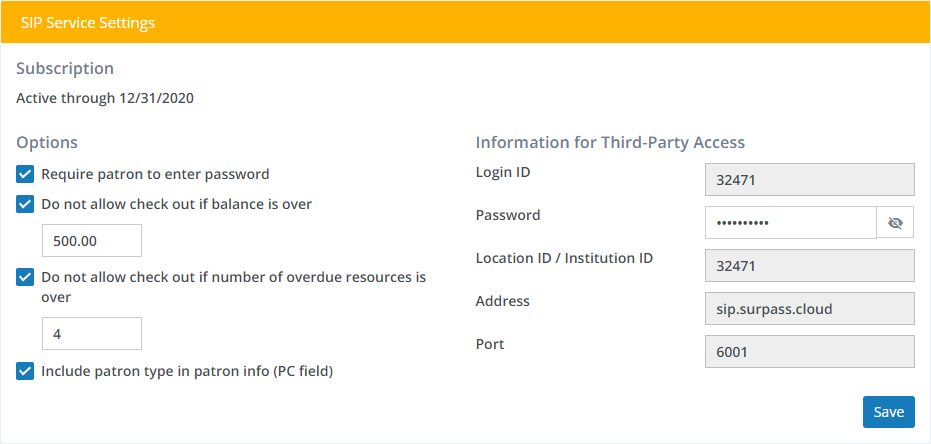
- Require patron to enter password - Typically, you would want your provider to ask for both the patron's ID and password. Un-check this box to allow patrons to access content with their patron ID number alone.
- Do not allow check out if balance if over - Check this box and enter an amount if you want to prevent patrons who have a fines balance over this amount from accessing the services. Setting the amount to 0.00 would mean that patrons with fines of any amount would not be blocked from accessing.
- Do not allow check out if number of overdue resources is over - Check this box and enter a number to prevent patrons who have more than a given number of overdue resources from accessing e-book or other content on the services. Setting the number to 0 would mean that patrons who have any overdue resources would be blocked from accessing the services.
- Include patron type in patron info (PC field) - Ask your service provider whether it requires this information. If checked, the short caption of the patron type will be included in the data sent to the service provider.
Information for Third-Party Access
This is the technical information that your service provider will require to access your patron data. Except for one item, the password, all of the values shown here are informational and cannot be edited.
- Login ID - The ID code the third-party will need to use to log in to your SIP Service. Technical info: should be provided in
CN(login user ID) field in93(login) requests. - Password - The password the third party will need to use to log in to your SIP Service. Click the "eye" icon to show the password. You can also edit the password here. Technical info: should be provided in
CO(login password) field in93(login) requests. - Location ID / Institution ID - The third-party will need to include code in requests. Technical info: should be provided in
CPfield (location code) field in93(login) requests, and in theAO(institution id) field in other requests. - Address - The internet address of the Surpass Cloud SIP Service.
- Port - The port number of the Surpass Cloud SIP Service.
If your service provider asks which version of SIP your library uses, you can tell them that it's SIP 2.
We are happy to help by working directly with your service provider to make sure everything is set up and working properly. Just ask them to contact Surpass Support and we'll take it from there.